Discord (Headless)
This scrobbler uses Now Playing functionality to set your Discord Rich Presence to the music you are currently monitoring with multi-scrobbler.
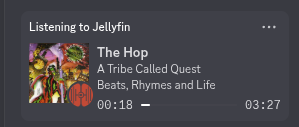
This integration is headless, it does not depend on any specific Discord application to be running.
Check the main Discord docs page for a comparison between App and Headless.
How MS Uses Discord API
Multi-scrobbler does its utmost to implement, to-spec, Gateway API communication and respect usage. It requires no permissions and reads no data other than monitoring what other user sessions are active.
Aside from the on-paper violation of using a user token programmatically (on your behalf), there is no misuse of the API to achieve rich presence.
Additionally, MS uses the state of non-MS sessions to conservatively update presence. By default it will not conflict with any other official presence activities and is only used when you are actually active on a device.
REQUIRED Interaction after Starting Multi-Scrobbler
Every time multi-scrobbler is started a discord session update needs to be triggered so that MS can capture the signals it uses to determine if presence can be updated. This only needs to be once, after starting multi-scrobbler. But it does need to be every time multi-scrobbler is (re)started. Without these signals MS will not update presence.
This session update can happen automatically after some time so you may not need to do anything. If you want to force the update then do one of the following:
- Open discord on a device it was not recently active on
- Exit discord on an active device
- Change your status (online, idle, etc...)
- Set a custom status
- Cause a presence update with a different app (listening to..., playing..., etc.)
Required Setup
User Token
You must provide a Discord User Token for your account in order to authenticate with Discord.
User Token usage violates Discord TOS
This functionality requires you to use your own Discord User Token in a way that is against Discord's policies/terms of service. If you use this scrobbler you do so at your risk.
There is no precedent for Discord punishing users who use their own token for non-abuse/spam reasons but there is also no guarantee this lack of enforcement will continue.
Refer to the How MS Uses Discord API section above to gauge whether this risk is acceptable to you.
User Token is a Sensitive Credential
Treat your User Token like a login credential. Anyone who has your token can access Discord as you.
When finding instructions for obtaining this token only run commands, or follow steps, that you can understand and trust. Do not run commands you do not understand. Never give your token to someone else.
No instructions will be provided for obtaining a User Token because it is against Discord's policies to use it. Instead, you can search online for "how to obtain discord user token".
Optional Setup
Configure When Presence Is Used
MS uses several signals from your "real" Discord sessions to determine if it should update presence. The default configuration is conservative to ensure that MS does not conflict with other apps using presence. Additionally, it only updates if a "real" user device is active on discord.
Without any additional configuration, MS will only update presence if:
- you have discord open on a real device
- your status is either: online, idle, or dnd (not invisible)
- no other apps are broadcasting listening activities (listening to spotify, etc...)
Online Status
Configure if MS is allowed to update presence based on your online status. If this setting is not defined MS will only update if your status is online, idle, or dnd.
Allowed Values: online idle dnd invisible
Example
Only allow presence updating when all of your "real" sessions are either online or idle.
In File/AIO:
[
    {
      "name": "MS",
      "enable": true,
      "data": {
        "token": "Ma7XBvzRERK3gQdkX4dkb3OQ.6aaGmJ.rvFiiVrzG4VXHHL3LyhZYhpWdG3Ph_if9aKz5E",
        "applicationId": "8190211179716453570",
        "statusOverrideAllow": ["online", "idle"]
      }
    }
  ]
In ENV:
DISCORD_STATUS_OVERRIDE_ALLOW=online,idle
Other Listening Activities
Without any additional configuration, MS will not set Rich Presence if other apps are broadcasting listening activities EX "Listening to Spotify".
What about other activity types?
Discord uses an undocumented activity type priority to determine what activity is shown "first" for your profile. The Listening activity type has the lowest priority.
This means that if you start any other type of activity (streaming, watching, competing, etc...) it will take precedence over MS's listening activity.
Your listening activity will still be visible by clicking into your full profile.
Configure the names of other listening activities that MS is allowed to broadcast at the same time as.
Example
You want to allow MS to update presence even if Spotify is also broadcasting a listening activity.
In File/AIO:
[
    {
      "name": "MS",
      "enable": true,
      "data": {
        "token": "Ma7XBvzRERK3gQdkX4dkb3OQ.6aaGmJ.rvFiiVrzG4VXHHL3LyhZYhpWdG3Ph_if9aKz5E",
        "applicationId": "8190211179716453570",
        "listeningActivityAllow": ["spotify"]
      }
    }
  ]
In ENV:
DISCORD_LISTENING_ACTIVITY_ALLOW=spotify
Discord Application
Creating a Discord App enables you to use custom album cover art and secondary status images for more links. Creating an App is free and simple, it is recommended you do this to get the most functionality from Rich Presence.
Create An Application
Go to the Discord Developer Portal
- Click on "New Application" and give it a name
- Copy the Application Id (Client Id) shown after creation
- Add this Id to your Multi-Scrobbler config
- Env Config =>
DISCORD_APPLICATION_ID=12345678 - File Config =>
"applicationId": "12345678"
- Env Config =>
Artwork
Multi-scrobbler can display Album Art in your Discord status. The image that is used differs based on if the image URL is publically accessible.
If no Application Id is configured the status art will always be the Discord Default.
The order in which multi-scrobbler determines what image to use is the same as the order of the tabs shown below.
Artwork URL Types
- External URLs
- Musicbrainz/Cover Art Achive
- MS Default
- Discord Default
When Application Id is configured MS can use external URLs for artwork.
External URLs that are not from known music services are disabled by default. This is to preserve your privacy because Discord does not host images, it only links to them and the URL is visible to other users.
Why Should I Care?
There are some scenarios where you may not want your artwork URLs to be visible, for example:
- A Source may be accessible only on your LAN (Jellyfin at
http://192.168.0.101) - A Source may be internet-facing but you do not want to expose this information to discord/other users
- A Source may be internet-facing but requires authentication to view the image
MS will use your artwork URLs only if:
- artwork url is from a known music service/Cover Art Archive or
- artwork url starts with
httpsandartwork(DISCORD_ARTWORK) istrue=> always uses the url- a list of custom domains keywords an external artwork url should contain EX
- ENV =>
DISCORD_ARTWORK=mycdn,jellyfin - File Config =>
"artwork": ["mycdn","jellyfin"]
- ENV =>
Examples
None of the below URLs will ever be used because they are not https
http://foobar.com/cool.jpg <-- NOT allowed, not http
http://192.168.0.112/fun.png <-- NOT allowed, not http
When DISCORD_ARTWORK is not set:
https://archive.org/download/dir/myimage.jpg <-- allowed, is https and known service
https://spotify.com/assets/cover.png?size=1000 <-- allowed, is https and known service
https://example.com/cool.jpg <-- NOT allowed, is https but not a known service and DISCORD_ARTWORK is not set
https://anything.com/neat.jpg <-- NOT allowed, is https but not a known service and DISCORD_ARTWORK is not set
Setting DISCORD_ARTWORK=true
https://archive.org/my/dir/myimage.jpg <-- allowed, is https and known service
http://foobar.com/cool.jpg <-- NOT allowed, not http
https://example.com/cool.jpg <-- allowed, is https
https://anything.com/neat.jpg <-- allowed, is https
Setting DISCORD_ARTWORK=mycdn,jellyfin
https://archive.org/my/dir/myimage.jpg <-- allowed, is https and known service
http://foobar.com/cool.jpg <-- NOT allowed, not http
https://example.com/cool.jpg <-- NOT allowed, is https but does not contain "mycdn" or "jellyfin"
https://jellyfin.mydomain.com/neat.jpg <-- allowed, is https and contains "jellyfin"
When Application Id is configured MS can try to use Cover Art Archive to get album art. The URL it retrieves is public which means it acts like an External URL that is always available for you.
MS will try to use Cover Art Archive if:
- The scrobble data does not contain an album art url (no art in dashboard) or the existing url has failed an External URL condition
- and the scrobble data contains a Musicbrainz Release (Album) MBID
Basically, if MS would normally use the MS Default art, it will first try to use Cover Art Archive if the scrobble has a Release MBID.
Some Source, like Jellyfin and Plex, can automatically provide this ID if the music is "matched" in your library.
For all others, you can configure MS to use the Musicbrainz Stage for Discord to try to get this MBID.
When Application Id is configured and these conditions are true:
- Cannot use an External URL and
- Cannot get album art from Cover Art Archive and
- Play does not contain artwork information (no artwork shown in dashboard)
The status artwork will use a default URL instead of your artwork URL.
Without any other configuration, the default URL is an icon from the multi-scrobbler repository:

This default image can be customized:
- ENV Config =>
DISCORD_ARTWORK_DEFAULT_URL=https://cooldomain.com/art.png - File Config =>
"artworkDefaultUrl": "https://cooldomain.com/art.png"
Remember, this URL need to be accessible on the public internet.
When Application Id is not configured Discord will show its own image. No custom artwork can be used in this configuration.
This is also the image Discord will display if the artwork URL cannot be fetched.

Configuration
- ENV
- File
- AIO
This is configuration for the ENV Config Type.
| Environmental Variable | Type | Default | Description |
|---|---|---|---|
DISCORD_ID | string | A globally unique ID EX myComponentId | |
DISCORD_NAME | string | Value of DISCORD_ID | A vanity name EX My Cool Component |
DISCORD_TOKEN | string | User Token acquired from an active Discord sessions | |
DISCORD_APPLICATION_ID | string | Application ID used to display album art | |
DISCORD_ARTWORK | boolean | A boolean indicating if external artwork URLs should be used. Or a comma-separated list of allowed domains | |
DISCORD_ARTWORK_DEFAULT_URL | string or boolean | A URL of an image to use as a fallback if the album art URL cannot be used. Or false to use discord's default. | |
DISCORD_STATUS_OVERRIDE_ALLOW | string | online,idle,dnd | A comma-separated list of statuses are allowed to have presence. |
DISCORD_LISTENING_ACTIVITY_ALLOW | string | A commera-seperated list of listening activity names MS is allowed to broadcast presence at the same time as. |
Bold/Italic = Required
Config Structure
This displays the structure of the File Configuration for a discord type Client with all possible properties, their shape, and descriptions/types. Use this to understand how to write a valid config.
Config Example
This displays an example config file of a discord Client File Configuration that adheres to the shown Config Structure.
- text mode lets you edit the JSON directly.
- tree mode gives you a guided point-and-click editing experience that always keeps the JSON syntax valid.
Both modes validate that the configuration is correct. Any errors show up as squiggly lines.
After you finish editing, switch to text and then copy all text to get a completed config.
Config Example Mobile Experience
This displays an example config file of a discord Client File Configuration that adheres to the shown Config Structure.
The example config file editor is meant for a larger screen experience so only the read-only example is shown. Please use this site on a tablet/laptop/desktop to enable file editor features.
[
  {
    "name": "Discord",
    "enable": true,
    "id": "myDiscordRemote",
    "data": {
      "token": "Ma7XBvzRERK3gQdkX4dkb3OQ.6aaGmJ.rvFiiVrzG4VXHHL3LyhZYhpWdG3Ph_if9aKz5E",
      "applicationId": "8190211179716453570"
    }
  }
]
Config Structure
This displays the structure of the all-in-one (config.json) configuration with all possible properties, their shape, and descriptions/types. Use this to understand how to write a valid config.
Select the discord type from the respective clients node below, then expand it.
Config Example
This displays an example config file of a all-in-one (config.json) configuration that includes a discord Client that adheres to the shown Config Structure.
- text mode lets you edit the JSON directly.
- tree mode gives you a guided point-and-click editing experience that always keeps the JSON syntax valid.
Both modes validate that the configuraion is correct. Any errors show up as squiggly lines.
After you finish editing, switch to text and then copy all text to get a completed config.
Config Example Mobile Experience
This displays an example config file of a all-in-one (config.json) configuration that includes a discord Client that adheres to the shown Config Structure.
The example config file editor is meant for a larger screen experience so only the read-only example is shown. Please use this site on a tablet/laptop/desktop to enable file editor features.
{
  "clients": [
    {
      "name": "Discord",
      "enable": true,
      "id": "myDiscordRemote",
      "data": {
        "token": "Ma7XBvzRERK3gQdkX4dkb3OQ.6aaGmJ.rvFiiVrzG4VXHHL3LyhZYhpWdG3Ph_if9aKz5E",
        "applicationId": "8190211179716453570"
      },
      "type": "discord"
    }
  ]
}