Overview
A Client is an application that stores the historical information about what songs you have played (scrobbles). Examples are Maloja, Last.fm, Listenbrainz...
Clients
| Name | Now Playing |
|---|---|
| Discord | ✅ |
| Last.fm | ✅ |
| Libre.fm | ✅ |
| Listenbrainz | ✅ |
| Koito | ✅ |
| Maloja | ❌ |
| Rocksky | ✅ |
| Teal.fm | ✅ |
| Tuneshine | ✅ |
Features
Duplicate Detection
Before a Play is scrobbled to a client MS checks existing scrobbles from the Client's API to see if the Play has already been scrobbled.
For each Play, MS fetches (cached) scrobbles from the Client in a time range inclusive of the Play's listening timestamp and then scores existing scrobbles against the Play based on:
- Similarity of Title, Artists, and Album
- Temporal closeness of the Play's timestamp to the existing scrobble's timestamp
- Whether MS detected the Play as a repeat (applicable to Sources that report realtime Player data)
Detailed scoring breakdowns against each existing scrobble are logged at the TRACE logging level or in the debug data for a scrobble.
See the Duplicate Scrobble Guidance page to learn how duplicates are detected and how you can ensure your configuration avoids possible duplicates.
Dead Scrobbles
If multi-scrobbler is unable to submit a scrobble to a Client then it places the scrobble into a queue which is retried every 5 minutes for a number of times before it gives up.
After it stops automatically retrying the scrobble still exists and can be retried from the dashboard. Dead scrobbles persist between restart so you will never lose a scrobble that hasn't been successfully submitted yet.
Now Playing
Multi-scrobbler can report the currently playing tracks it is monitoring to some Scrobble Clients via their individual Now Playing functionality.
Now Playing is default enabled for all Clients that support it.
The behavior multi-scrobbler uses for determining Now Playing reporting:
- Now Playing can be explicitly enabled or disabled globally using ENV
NOW_PLAYING=trueorNOW_PLAYING=false- This only affects Clients that don't have behavior set via File/AIO (below)
- Now Playing will be only be reported to the same Clients a Source is configured to scrobble to
- A Source's Player status must be Playing, IE active, for reporting to occur
- This status can be verified via Player UI on the Dashboard
- If multiple Sources having active Players then the scrobble Client will default to reporting the track based on Source configuration name, alphabetically
- This is the
nameproperty set in File or AIO source configs
- This is the
Clients can customize the Now Playing behavior individually using File or AIO source configs:
[
  {
    "name": "myLastFmClient",
    "configureAs": "client",
    "data": {
      // ...
    },
    "options": {
        // disable or enable
        //"nowPlaying": true
        //
        // OR define a list of Source *config* names that should be allowed to report Now Playing
        // order of the list determines priority for reporting Now Playing
        //"nowPlaying": ["mySpotify1","myJellyfin2"]
    }
  },
]
Monitoring Activity
Monitoring activity for a Source/Client can be explicitly toggled on/off from each Source/Client respective details page by choosing Ignore or Monitor from the Status dropdown.
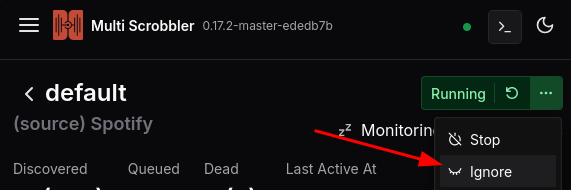
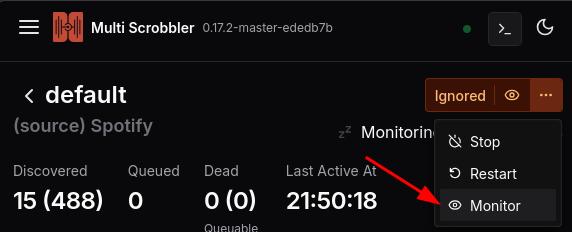
When a Source/Client is not monitored it will still show activity (like an active Player) but the resulting Play will marked as Discarded.
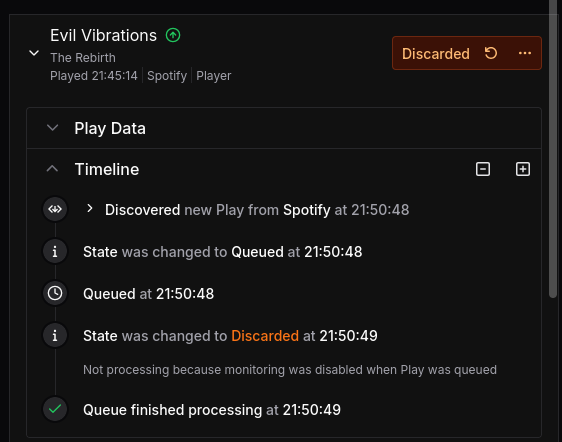
Discarded Plays are not forwarded from Sources -> Clients (Discovered) and for Clients are not Scrobbled to downstream scrobble clients.
If you do want to Discover/Scrobble a discarded Play then click the Retry icon on the Play's status to force it to be processed.
Default Monitoring and Activity Detection
All Sources/Clients have monitoring enabled automatically (except those explicitly documented as requiring monitoring configuration).
You can manually define whether a Source/Client starts, or is created, with monitoring enabled automatically by adding the following value to a Source/Client's options in file or aio config:
{
    "data": {
        // ...
    },
    "options": {
        // set to true to always monitor automatically
        // set to false to never monitor automatically
        "autoMonitor": true
    }
}