Help
Getting Useful Data
Logs
Multi-scrobbeler has a real-time log shown in the dashboard. These are the same logs you would find in docker logs. In the dashboard, logs can be filtered by LEVELS to give you a better view of errors/warnings.
When creating an issue please include all logs at the lowest level possible (DEBUG) to help provide context for your issue. You should try to include logs that occurred before and after your issue/error occurs as this can help determine if MS was behaving normally.
Debug Mode
If possible, turn on Debug Mode and replicate your issue. Debug Mode enables much more logging that can reveal additional data for troubleshooting.
This mode will make your logs very noisy, though, so it's recommended to turn it off after collecting logs.
Copy Play Debug Data
From the dashboard, each Source/Client has a few details page links:
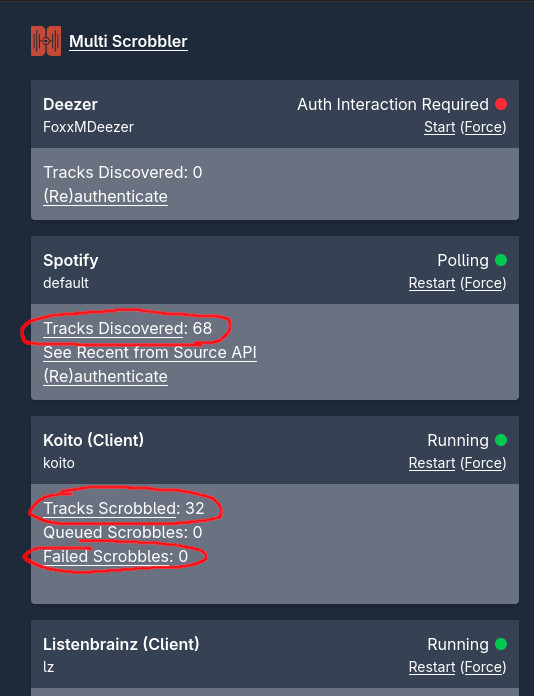
Opening the details page for the Source/Client reveals a lists all of the Plays that were discovered (Sources) or scrobbled (Clients).
Click on the Debug icon to copy debugging data relevant to that Play. This data should be included in any issue you create.
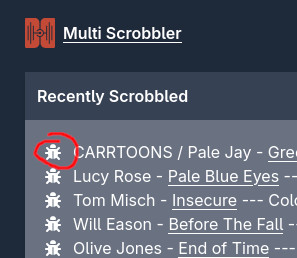
To include this data in an issue either paste the copied data into a text file and save as debugdata.json, attaching to the issue.
Or directly paste the copied data into an issue/comment using fenced code blocks markdown to preserve the structure like:
This is the contents of my comment/issue text on github.

I am explaining my issue here. Here is the debug data:

```json
{
  "input": {
    "aProperty: 123,
    "foo": "bar"
  }
}
```

Thank you for your time.
Finding Help
FAQ
Check the FAQ to see if your issue is a known issue or a commonly-experienced issue with Multi-Scrobbler. The FAQ also includes fixes or ways to help troubleshoot these common issues.
Existing Issues
On the github repository for Multi-Scrobbler, search existing issues and discussions to see if anyone else has had this issue and if it has already been solved.
Reporting an Issue
Before reporting an issue please consider:
- If this a how-do-I question, troublehooting, or generally not a bug/error with multi-scrobbler please consider starting a discussion instead of opening an issue
- If you want to request new functionality use the Feature Request issue template
- If you want to request a new Source/Client implementation use the New Source/Client issue template
If none of the above apply to you then create a new bug report. Please include all logs and play debug data relevant to your issue. The more logs the better. If possible, replicate the issue with debug mode turned on.